
Mastering the core mechanics, optimization, and hidden production traps of the Outer & Anti Join family.
I. Introduction: When Missing Data is the Answer
In our previous article, we dissected how the Inner Join family operates like a matchmaker who only cares about a perfect match. It demands absolute harmony between the relational keys in both tables. However, the real world is rarely that ideal.
What if, in daily operations, the most valuable information actually lies in the data that has no partner?
Imagine the HR department asking, “Which of our interns have not yet been assigned to a department?” Or the business expansion team asking, “Which branches have their physical assets ready but are not yet staffed by a single employee?” If you insist on using an INNER JOIN to answer these questions, your result will be absolutely nothing. The exact data you are looking for will be wiped clean by the database engine.
This is where Outer Joins and Anti Joins come in as heroes. Their job is not to discard mismatches, but to document them. This article will break down the Outer Join family tree, the mechanics behind the scenes, and three NULL “booby traps” that frequently cripple production servers.
To make things easier to follow, all scenarios in this article are based on the CorporateRetailDb database, just like in our previous piece on Inner Joins.
Data Note: In our database, we have Branch 50 (Ambon) which has no employees at all, and Employee 106 (Staf Magang) whose
BranchIdcolumn isNULL(unassigned).
II. The Outer Join Family Tree (Theory vs. Practice)
Unlike Inner Joins, the Outer Join family grants special privileges to one or both tables to retain all of their rows, even if there is no match in the opposing table. Columns that lose their partner are automatically populated by a special value: NULL.
A. LEFT OUTER JOIN: Left-Side Priority
Conceptually, a Left Outer Join instructs the database engine to treat the left table (the table written first, right after the FROM clause) as the primary anchor. Every single row in the left table must be included in the output. In relational algebra, this operation is symbolized by ⟕.
Employee ⟕ Branch
Real-World Case: HR requests an internal census report to see the placement distribution of all staff members. We must display all employees, including those who do not have an assigned branch yet (like our intern). Relational algebra expression:
πEmployeeId, Name, Salary, BranchName (Employee ⟕ Branch)
SQL
SELECT EmployeeId, Name,
   Salary, BranchName
FROM Employee e
LEFT OUTER JOIN Branch b
ON e.BranchId = b.BranchId;
Execution Result
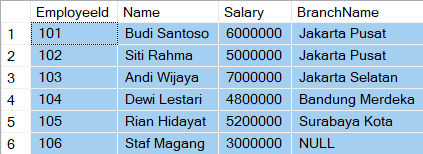
Employees 101 through 105 are neatly paired with their respective branches. Meanwhile, ‘Staf Magang’ still appears, but with the BranchName column showing NULL. The employee data is not lost.
B. RIGHT OUTER JOIN: A Matter of Perspective and Big Data
A Right Outer Join is the geometric inverse of a Left Join. It prioritizes the right table (the table written after the JOIN keyword). In relational algebra, this operation is symbolized by ⟖.
Employee ⟖ Branch
Real-World Case: Management wants to evaluate the utility of physical assets. Display every single branch without exception, along with the names of the employees assigned to each. Relational Algebra Expression:
πName, Salary, Branch.BranchId, BranchName (Employee ⟖ Branch)
SQL
SELECT EmployeeId, Name,
   b.BranchId, BranchName
FROM Employee e
RIGHT OUTER JOIN Branch b
ON e.BranchId = b.BranchId;
Execution Result:
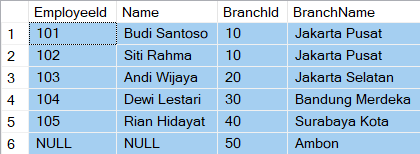
All branches from ID 10 to 40 will display their employee names. Interestingly, the Ambon Branch (ID 50) will still show up at the very bottom row, with all employee-related columns (EmployeeId and Name) filled with NULL
💡 Architectural Debate (Fun Fact)
Mathematically speaking:
R ⟕ S ≡ S ⟖ R
We could technically eliminate every single RIGHT JOIN syntax in the world and replace them with LEFT JOIN simply by flipping the table order.
So why was RIGHT JOIN created? First, for code readability, allowing developers to write queries that follow natural human thought progression from left to right without completely rewriting the structure of the FROM clause. Second, in modern Big Data engines (such as Apache Spark SQL or Hive), explicit LEFT or RIGHT notation acts as a critical physical hint for the Query Optimizer to determine which table is small enough to load into memory (Broadcast/Lookup Table) and which one is the massive dataset (Fact Table).
C. FULL OUTER JOIN: Consolidating Two Universes
When you don’t want to sideline either side, the Full Outer Join (⟗) is the answer. It extracts all rows from both the left and right tables.
Employee ⟗ Branch
Real-World Case: A comprehensive post-merger audit. Display all entities present in the system to detect anomalies on both sides simultaneously. Relational Algebra Expression:
πEmployeeId, Name, Branch.BranchId, BranchName (Employee ⟗ Branch)
SQL
SELECT EmployeeId, Name,
   b.BranchId, BranchName
FROM Employee e
FULL OUTER JOIN Branch b
ON e.BranchId = b.BranchId;
Execution Result
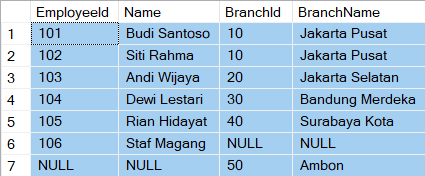
This query yields the most complete report. You will see ‘Staf Magang’ with a NULL branch (a left-side anomaly), while simultaneously seeing the ‘Ambon Branch’ with a NULL employee name (a right-side anomaly) all within the same result table.
III. Entering Exclusive Territory: The Anti Join Family
While Outer Joins display both paired and unpaired data, an Anti Join takes a more radical step: it only passes rows that have no match whatsoever.
Unfortunately, there is no universally standardized symbol for this in relational algebra. Unlike the standard join (⋈), left semijoin (⋉), and right semijoin (⋊), anti-join notations vary widely depending on the textbook, research paper, or website.
A. Using JOIN + IS NULL
Left Anti Join
Finding employees who have not been assigned to any branch. The relational algebra expression can be written as:
πEmployeeId, Name, Salary, Employee.BranchId (σBranchName=⊥ (Employee ⟕ Branch))
SQL
SELECT e.*
FROM Employee e
LEFT OUTER JOIN Branch b
ON e.BranchId = b.BranchId
WHERE b.BranchId IS NULL;
Execution Result:

Right Anti Join
Finding branches that do not have any employees yet. The relational algebra expression can be written as:
πBranch.BranchId, BranchName, CityId, MinSalaryTarget (σEmployeeId=⊥(Employee ⟖ Branch))
SQL
SELECT b.*
FROM Employee e
RIGHT OUTER JOIN Branch b
ON e.BranchId = b.BranchId
WHERE e.EmployeeId IS NULL;
Execution Result:

Under the Hood Mechanics: The database engine is forced to perform a full Left/Right Outer Join operation in memory first. All rows are merged, NULL values are assigned to empty branches, and only then does the WHERE clause filter out and discard rows that do not contain a NULL. This is a massive waste of I/O resources if your tables are huge.
B. Short-Circuiting with NOT EXISTS
This is a much more elegant approach. The engine uses a short-circuit technique via NOT EXISTS. The two queries above should ideally be replaced with the following SQL statements:
-- Employees who haven't been assigned to any branch
SELECT e.*
FROM Employee e
WHERE NOT EXISTS
  (SELECT 1
   FROM Branch b
   WHERE b.BranchId = e.BranchId);

-- Branches that do not have any employees yet
SELECT b.*
FROM Branch b
WHERE NOT EXISTS
   (SELECT 1
    FROM Employee e
    WHERE e.BranchId = b.BranchId);
When scanning the Branch table, the engine simply peeks at the Employee table’s index. The moment it sees that BranchId = 50 (Ambon) does not exist in the employee table, the Ambon row is immediately passed to the output without needing to allocate memory to merge columns.
⚡ Modern Query Optimizer Fact: In 2026, Query Optimizers in high-end DBMSs are incredibly smart. Even if you write a
JOIN + IS NULL, the Optimizer will often perform an automatic query transformation behind the scenes, converting the physical execution plan directly into a Left/Right Anti Join to save your server’s memory performance.
C. Emergency Warning: The Fatal Pitfall of the NOT IN Clause
When facing an Anti Join scenario, you might be tempted to use a NOT IN clause because the syntax feels incredibly intuitive and human-readable:
SQL
-- DO NOT DO THIS!
SELECT b.*
FROM Branch b
WHERE b.BranchId NOT IN
  (SELECT e.BranchId
   FROM Employee e);
Why is the query above an absolute disaster? Because our table contains ‘Staf Magang’ whose BranchId column is NULL. In SQL, any comparison operation involving NULL yields an Unknown truth value. Consequently, the presence of just a single NULL inside the subquery will cause the NOT IN clause to completely break down, permanently returning 0 rows. The Ambon branch you were looking for completely vanishes!
If you absolutely insist on using NOT IN, you are forced to filter out those NULL values within the subquery:
-- A safer alternative, but still risky if you are careless
SELECT b.*
FROM Branch b
WHERE b.BranchId NOT IN
   (SELECT e.BranchId
    FROM Employee e
    WHERE e.BranchId IS NOT NULL);
Due to this high risk of human error, database architects always recommend ditching NOT IN entirely and switching fully to NOT EXISTS, which is naturally immune to NULL value interference.
IV. The “Hall of Shame”: 3 SQL Booby Traps That Frequently Escape to Production
Outer Join mistakes rarely trigger syntax errors. Your query will run flawlessly, the server indicators will stay green, but the data presented to the board of directors will be quietly and completely wrong. Here are 3 production horrors you must watch out for:
Trap 1: Business Logic Filtering (ON vs. WHERE Clause)
Consider these two queries aiming to display all branches along with high-earning employees (salary > 5,500,000).
Query A (Filtering in the ON clause – Correct)
SELECT b.BranchId,
   BranchName, Name, Salary
FROM Branch b
LEFT OUTER JOIN Employee e
ON b.BranchId = e.BranchId
AND e.Salary > 5500000;
Execution Result:
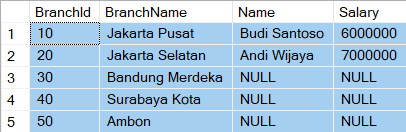
It displays all branches (5 branches). For branches that have employees earning below 5,500,000 or have no employees at all (like Bandung Merdeka, Surabaya Kota, and Ambon), the employee columns automatically become NULL. Meanwhile, for Jakarta Pusat, only the high-earning staff (Budi Santoso) is displayed, while the low-earning staff (Siti Rahma) is eliminated from the results without removing the Jakarta Pusat branch row itself.
Query B (Filtering in the WHERE clause – Broken!)
SELECT b.BranchId,
   BranchName, Name, Salary
FROM Branch b
LEFT OUTER JOIN Employee e
ON b.BranchId = e.BranchId
WHERE e.Salary > 5500000;
Execution Result:

This query suddenly morphs into an INNER JOIN and only displays branches that have high-earning employees! Why? Because when the database evaluates the Ambon branch or low-earning employees (which yield NULL), the WHERE clause tests: NULL > 5500000. In SQL logic, comparisons with NULL always evaluate to Unknown, causing all empty branch rows to be ruthlessly discarded.
Trap 2: Mysterious Aggregations (COUNT(*) vs. COUNT(column))
You are asked to count the total number of staff members in each branch after a LEFT JOIN.
Flawed Query — COUNT(*)
SELECT b.BranchId, BranchName,
   COUNT(*) AS TotalStaff
FROM Branch b
LEFT OUTER JOIN Employee e
ON b.BranchId = e.BranchId
GROUP BY b.BranchId, BranchName;
Execution Result:
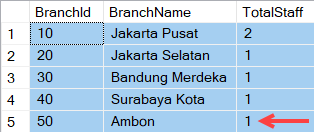
The Bug Effect: The Ambon branch will be reported as having 1 Staff member! This happens because COUNT(*) counts the total number of physical rows that pass the join operation. Since Ambon retains its row (even though the employee side is entirely NULL), it is still counted as 1 row.
Correct Query — COUNT(column)
SELECT b.BranchId, BranchName,
   COUNT(e.EmployeeId) AS TotalStaff
FROM Branch b
LEFT OUTER JOIN Employee e
ON b.BranchId = e.BranchId
GROUP BY b.BranchId, BranchName;
Execution Result:
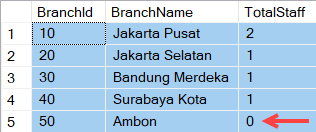
The Solution: The COUNT(e.EmployeeId) function inherently ignores NULL values. The Ambon branch will be accurately reported as having 0 Staff.
Trap 3: Server Collation Changes (Case-Sensitivity)
If your join condition involves text data types (for example, matching area codes like CityId), a query that runs safely on your local machine can suddenly break when deployed to the cloud.
If your local server uses a SQL_Latin1_General_CP1_CI_AS (Case-Insensitive) configuration, then JKT and jkt are considered a match. However, if the production server uses a Case-Sensitive Collation (as found in certain PostgreSQL installations or specific Docker SQL Server setups), that text match immediately fails. Your Outer Join results will be flooded with false NULL values due to the case mismatch.
V. Conclusion & Best Practices
Mastering Outer Joins isn’t just a matter of memorizing Venn diagrams or left-and-right orientations. It’s about training your logical sensitivity toward data existence and NULL value handling.
Before you push your Outer Join queries to production, make sure you stick to this tactical checklist:
- Use
NOT EXISTSfor Anti Join requirements to achieve optimal memory efficiency. - Lock non-relational filters inside the
ONclause if you want to preserve the Outer Join behavior, and useWHEREonly if you strictly intend to prune the final results. - Always use
COUNT(Column_Name)instead ofCOUNT(*)when aggregating data from a Left/Right Join.
Have you ever found your company’s financial reports in chaos just because of a misplaced COUNT(*) or a rogue WHERE filter on an Outer Join? Between LEFT JOIN + IS NULL and NOT EXISTS, which syntax has been your go-to favorite so far?
Let’s share your bitter and sweet experiences in the comments section below!
In the next article, we will conclude this join battle trilogy by discussing variations that are just as exotic and full of tricks: SELF JOIN and leveraging CROSS APPLY / LATERAL JOIN for complex queries. Stay tuned!
If you found this article helpful, feel free to buy me a coffee on Ko-fi. Your support helps me keep writing!
Bibliography
- Codd, E.F. (March 1972). “Relational Completeness of Data Base Sublanguages” in Computer Sciences. San Jose, California: IBM Research Laboratory.
- Connolly, Thomas M., & Begg, Carolyn E. (2015). Database Systems: A Practical Approach to Design, Implementation, and Management. 6th Edition. Essex, England: Pearson Education.
- Coronel, C., Steven, M., Crockett, K., & Blewett, C. (2020). Database Principles: Fundamentals of Design, Implementation, and Management. 3rd Edition. Hampshire, United Kingdom: Cengage Learning.