
Photo by 愚木混株 Yumu on Unsplash
I. Introduction
For most developers starting out with relational databases, writing their first JOIN query is an exciting milestone. Linking an Orders table with a Customers table, or connecting Products with Categories, feels intuitive. We naturally picture it as matching two physical index cards based on a shared “key.”
Then comes the concept of a Self-Join.
The idea of “joining a table with itself” often leaves beginner developers scratching their heads. Our visual logic hits a wall: How can a table join itself? Won’t that trigger a syntax error? Will it double the data in memory and crash the server?
This hesitation is completely natural. Humans are hardwired to process relationships between two distinct entities much more easily than reflexive relationships (an entity related to itself).
The good news? The mystery is far simpler than it appears.
First, let’s clear up a common misconception: Self-Join is not a keyword, feature, or specialized function in SQL. You will never see a command like:
SQL
SELECT *
FROM Employees
SELF JOIN Employees; -- This does not exist!
A Self-Join is purely a logical pattern. At the database engine level, we simply use standard JOIN operations (INNER JOIN, LEFT JOIN, etc.) and trick the system by using Aliases (AS).
Imagine printing two identical copies of the same employee roster onto paper. You label the left sheet "Employee" and the right sheet "Manager". To the computer, these are now two separate entities, even though the underlying data comes from the same storage. Through this simple trick, we can model complex real-world relationships—from organizational hierarchies and social networks to supply chain routing.
II. The Anatomy of Data Relationships in Self-Joins
2.1 Myth-Busting: Join Types vs. Data Relationships
Before diving into code, let’s dismantle a common misconception: many developers assume a Self-Join automatically implies a One-to-Many (1:N) relationship. That assumption is incorrect.
We need to strictly separate two distinct concepts:
- Join Type (The Tool): Defines how rows are filtered during a query (
INNER JOIN,LEFT OUTER JOIN, etc.). - Data Cardinality (The Relationship): Defines how entities interact in the real world (
1:1,1:N, orM:N).
A Self-Join is merely a querying technique. It is versatile enough to support any data cardinality present in your schema.
The most common scenario for a Self-Join occurs in One-to-Many (1:N) relationships. This structure represents hierarchical models such as org charts, multi-level product categories, or nested navigation menus.
Consider an Employees table. In the real world, the business rule states: One (1) manager can manage many (N) employees, but a regular employee reports directly to only one manager.
Because this relationship is asymmetrical, creating two separate tables (Managers and Employees) is redundant. Managers are also employees—they draw salaries, have employee IDs, and share the same attributes.
The elegant solution is a single table with a self-referencing Foreign Key column named ManagerId, which points back to the EmployeeId (Primary Key) within the same table.
| EmployeeId | Name | ManagerId |
| 1 | Budi Utomo (CEO) | NULL (Top of Hierarchy) |
| 3 | Dedi Kurniawan (IT Manager) | 1 (Reports to Budi) |
| 4 | Eka Saputra (Developer) | 3 (Reports to Dedi) |
When performing a Self-Join on this table, we are essentially walking up or down the branches of this organizational tree.
2.3 The M:N Exception: When a Single Table Isn’t Enough
What if the relationship is Many-to-Many (M:N)? Can we still execute a Self-Join within a single table?
Physically, no.
Relational database design rules strictly prohibit storing comma-separated lists of IDs inside a single column cell (e.g., storing 2, 3, 5 in a FriendId column). Doing so violates First Normal Form (1NF).
Consider a Social Media Network:
- A user can be friends with many other users.
- Those users can, in turn, be friends with many other users (including the first user).
To model this M:N pattern—even though both entities are “Users”—we must introduce a Junction Table (or Bridge Table).
The physical schema breaks down into two tables:
1. Primary Table: Users
| UserId | Username |
| 1 | @andreas |
| 2 | @beatrix |
| 3 | @chandra |
2. Junction Table: Friendships
| UserId1 | UserId2 |
| 1 | 2 (Andreas is friends with Beatrix) |
| 1 | 3 (Andreas is friends with Chandra) |
| 2 | 3 (Beatrix is friends with Chandra) |
Where does the “Self-Join” fit in here?
It happens in the SQL query logic. To list users and their friends’ names, you join Users to Friendships, and then join Friendships back to Users a second time. Because the query links Users to Users (via the junction table), it remains a Self-Join pattern.
III. Formal Proof: Relational Algebra & SQL
Theory without practice is incomplete. Let’s look at how self-referencing relationships are physically defined in SQL and queried mathematically using relational algebra.
3.1 Defining the Schema: The Recursive Table
First, let’s establish the schema. We define a recursive relationship using CREATE TABLE:
First, let’s define the database and activate it, then create the tables with recursive relationships.
CREATE DATABASE HRD;
GO
USE HRD;
GO
CREATE TABLE Employees (
    EmployeeId SMALLINT PRIMARY KEY,
    Name VARCHAR(30) NOT NULL,
    JobTitle VARCHAR(25) NOT NULL,
    ManagerId SMALLINT NULL,
    -- Self-Referencing Foreign Key Definition
    CONSTRAINT FkEmployeeManager
    FOREIGN KEY (ManagerId)
    REFERENCES Employees(EmployeeId)
);
The key line here is REFERENCES Employees(EmployeeId). Standard Foreign Keys reference a different table; here, it loops back to the Primary Key of the same table. This enforces data integrity at the engine level: the database will reject any entry referencing a non-existent manager ID.
3.2 Seeding Test Data
To properly evaluate edge cases (like handling NULL values), we populate the table with realistic test cases:
SQL
-- CEO/Executive: ManagerId = NULL
INSERT INTO Employees VALUES
(1, 'Budi Utomo', 'CEO', NULL);

-- Mid-Level Managers (report to CEO): ManagerId = 1
INSERT INTO Employees VALUES
(2, 'Citra Lestari', 'Marketing Manager', 1),
(3, 'Dedi Kurniawan', 'IT Manager', 1);

-- Staff (report to IT Manager): ManagerId = 3
INSERT INTO Employees VALUES
(4, 'Eka Saputra', 'Developer', 3),
(5, 'Fajar Ramadhan', 'Developer', 3);

-- New Intern (Unassigned): ManagerId = NULL
INSERT INTO Employees VALUES
(6, 'Gita Permata', 'Intern', NULL);- Budi Utomo (CEO): Present in the table, but has no manager (
NULL). - Gita Permata (Intern): Has not been assigned to a team yet (
NULL). - Citra, Dedi, Eka, Fajar: Standard hierarchy entries.
3.3 Query Execution: Relational Algebra vs. SQL
To align formal mathematics with practical code, we establish the following aliases:
- E = ρE (Employees) — representing the Employee side.
- M = ρM (Employees) — representing the Manager side.
Case A: Inner Join (Matched Pairs Only)
Used when HR wants a list of active employees who currently have an assigned manager.
Relational Algebra:
πE.Name, M.Name (E ⨝E.ManagerId=M.EmployeeId M)
SQL Query:
SELECT e.Name AS Employee,
   m.Name AS Manager
FROM Employees e
INNER JOIN Employees m
ON e.ManagerId = m.EmployeeId;
Execution Output:
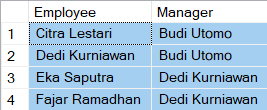
Behavior: INNER JOIN excludes non-matching records. Budi Utomo (CEO) and Gita Permata (Intern) drop out of the results because their ManagerId is NULL.
Case B: Left Outer Join (Complete Roster)
Used when executive management wants an all-inclusive roster, regardless of whether an employee has a manager assigned.
Relational Algebra:
πE.Name, M.Name (E ⟕E.ManagerId= M.EmployeeId M)
SQL Query:
SELECT e.Name AS Employee,
       m.Name AS Manager
FROM Employees e
LEFT OUTER JOIN Employees m
ON e.ManagerId = m.EmployeeId;
Execution Output:
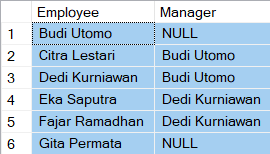
By using LEFT OUTER JOIN (⟕), we preserve all rows from the left table (E). Budi and Gita now appear in the results, with NULL in the Manager column.
Graceful Formatting with COALESCE():
SELECT e.Name AS Employee,
COALESCE(m.Name, 'Top Management/Unassigned') AS Manager
FROM Employees e
LEFT OUTER JOIN Employees m
ON e.ManagerId = m.EmployeeId;
Execution Output:
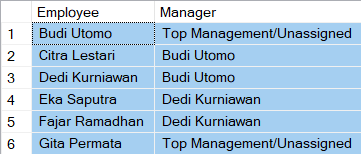
Case C: Full Outer Join (Bi-Directional Audit)
Used to identify all employees while simultaneously auditing managers who currently have no direct reports.
Relational Algebra:
πE.Name, M.Name (E ⟗E.ManagerId=M.EmployeeId M)
SQL Query:
SELECT e.Name AS Employee,
       m.Name AS Manager
FROM Employees e
FULL OUTER JOIN Employees m
ON e.ManagerId = m.EmployeeId;
Execution Output:
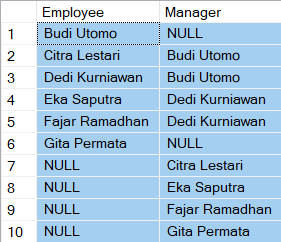
Behavior: Preserves unmatched records from both sides. For instance, Citra Lestari appears as a Manager with NULL under Employee, indicating she has no direct reports assigned yet.
Case D: Semi-Join (Identifying Managers)
Used to retrieve a list of employees who hold managerial responsibilities (i.e., those who have at least one direct report).
Relational Algebra:
E ⋉E.EmployeeId=M.ManagerId M
You can use the INNER JOIN, IN, or EXISTS clauses. Refer back to the previous article.
Preferred SQL approach using EXISTS:
SELECT e.*
FROM Employees e
WHERE EXISTS
(SELECT 1
FROM Employees m
WHERE e.EmployeeId = m.ManagerId);
Execution Output:

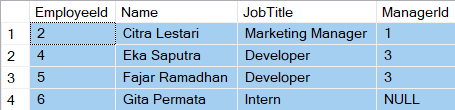
Case E: Anti-Join (Identifying Individual Contributors)
The inverse of a Semi-Join. This query finds “individual contributors” (staff/interns) who do not manage anyone.
Relational Algebra:
πE.* (σM.EmployeeId IS NULL (E ⟕E.EmployeeId=M.ManagerId M))
Preferred SQL Approach (Using NOT EXISTS):
SQL
SELECT e.*
FROM Employees e
WHERE NOT EXISTS
(SELECT 1
FROM Employees m
WHERE e.EmployeeId = m.ManagerId);
Execution Output:
IV. Common Pitfalls to Avoid
Writing a Self-Join is straightforward; ensuring its logical correctness requires careful attention. Working with a single table often leads to unexpected logical edge cases.
4.1 The Infinite Loop Trap (Circular References)
In a 1:N hierarchy, authority flows strictly downwards. A circular reference occurs when relationships form a closed loop (e.g., A manages B, B manages C, and C mistakenly gets set to manage A).
When executing recursive queries—such as Recursive Common Table Expressions (CTEs)—the database engine will get stuck in an infinite loop, consuming server resources until it hits maximum recursion limits or crashes.
Prevention: Enforce validation logic at the application layer or implement database triggers to prevent an employee from being assigned as a manager to their own supervisor.
4.2 Self-Matching / Duplication Trap
This pitfall frequently occurs when joining a table on non-key attributes (e.g., matching employees sharing the same job title).
-- INCORRECT: Produces self-matching entries
SELECT e.Name, m.Name, e.JobTitle
FROM Employees e
INNER JOIN Employees m
ON e.JobTitle = m.JobTitle;
Execution Output:
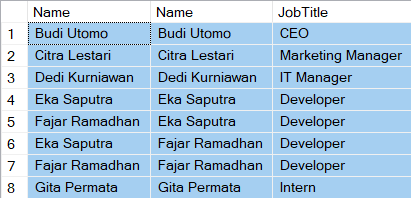
The Issue: Every row matches with itself (e.g., Eka Saputra pairs with Eka Saputra).
The Solution: Explicitly exclude identical Primary Keys:
SELECT e.Name, m.Name, e.JobTitle
FROM Employees e
INNER JOIN Employees m
ON e.JobTitle = m.JobTitle
AND e.EmployeeId <> m.EmployeeId;
4.3 Double Counting (Symmetrical Permutations)
Even after filtering out self-matches using <>, horizontal joins can still yield duplicate permutations (e.g., pairing Eka & Fajar as well as Fajar & Eka):

To eliminate redundant permutations, replace <> with the less-than operator (<):
SELECT e.Name AS Peer1,
   m.Name AS Peer2,
   e.JobTitle
FROM Employees e
INNER JOIN Employees m
ON e.JobTitle = m.JobTitle
AND e.EmployeeId < m.EmployeeId;
Execution Output:

By ensuring e.EmployeeId < m.EmployeeId, each pair is returned exactly once.
4.4 Missing Top-Level Entities (Accidental INNER JOIN)
Using an INNER JOIN on a hierarchical self-referencing relationship silently drops top-level entities (like the CEO) whose ManagerId is NULL.
Always default to a LEFT OUTER JOIN when querying hierarchical structures where top-level nodes lack parent references.
V. Advanced Techniques for Production Systems
5.1 Performance Optimization: Avoiding O(N2) Complexity
Joining a 500,000-row table to itself without proper indexing can ruin query performance.
Without an index on the join predicate (ManagerId), the database engine falls back to a Nested Loop Join, scanning the table repeatedly. This elevates the computational complexity to quadratic time: O(N2)..
The Fix: Always index self-referencing Foreign Key columns:
CREATE INDEX IxEmployeesManagerId
ON Employees(ManagerId);
This index transforms full table scans into direct Index Seeks, reducing query complexity to logarithmic time: O(N log N).
5.2 Time-Travel Queries using System-Versioned Temporal Tables
In the real world, data structures are alive and dynamic. Eka Saputra, who reported to IT Manager A last month, might be reassigned to report to IT Manager B this month due to an organizational restructuring.
If you only perform a conventional Self-Join on an active table, you will only get a snapshot of the truth at this exact second. Your historical data is buried. When the Board of Directors asks, “Who was Eka’s manager in January last year before the transfer?”, a standard Self-Join query will simply give up.
This is where seasoned pros leverage System-Versioned Temporal Tables (a built-in feature in SQL Server since version 2016). With this feature, the database automatically records every data change into a dedicated history table, complete with timestamps.
5.2.1 Enabling the System-Versioned Feature
The Employees table created in Chapter III is still a standard, regular table; SQL Server has not yet enabled its System-Versioning (Temporal Table) feature. The database will not automatically save a history log of data changes until this feature is activated. Follow these steps to enable it.
1. Add Period Columns & Enable Versioning
Run the following ALTER TABLE script:
-- Step 1: Add time period columns (Start Time & End Time)
ALTER TABLE Employees
ADD
   SysStartTime DATETIME2 GENERATED ALWAYS AS ROW START HIDDEN
   CONSTRAINT DF_Employees_SysStart DEFAULT SYSUTCDATETIME(),
   SysEndTime DATETIME2 GENERATED ALWAYS AS ROW END HIDDEN
   CONSTRAINT DF_Employees_SysEnd DEFAULT '9999-12-31 23:59:59.9999999',
   PERIOD FOR SYSTEM_TIME (SysStartTime, SysEndTime);
GO

-- Step 2: Enable the System Versioning feature and specify its history table
ALTER TABLE Employees
SET (SYSTEM_VERSIONING = ON (HISTORY_TABLE = dbo.EmployeesHistory));
GO
Note: The HIDDEN keyword above is optional. Its purpose is to prevent the SysStartTime and SysEndTime columns from appearing when you run a SELECT * FROM Employees command.
2. (Optional) Creating the Table Structure From Scratch
If you want to update the CREATE TABLE Employees script from Chapter III so that it supports Temporal Tables right from the start, the script will look like this:
sql
CREATE TABLE Employees (
   EmployeeId SMALLINT PRIMARY KEY,
   Name VARCHAR(30) NOT NULL,
   JobTitle VARCHAR(25) NOT NULL,
   ManagerId SMALLINT NULL,

   -- Required Columns for Temporal Tables
   SysStartTime DATETIME2 GENERATED ALWAYS AS ROW START HIDDEN NOT NULL,
   SysEndTime DATETIME2 GENERATED ALWAYS AS ROW END HIDDEN NOT NULL,
   PERIOD FOR SYSTEM_TIME (SysStartTime, SysEndTime),

   -- Recursive Relationship
   CONSTRAINT FkEmployeesManager
   FOREIGN KEY (ManagerId) REFERENCES Employees(EmployeeId)
)
WITH (SYSTEM_VERSIONING = ON (HISTORY_TABLE = dbo.EmployeesHistory));
GO
💡 What Happens After This Feature Is Active?
- SQL Server will automatically create a new table named
dbo.EmployeesHistory. - Every time an
UPDATEorDELETEcommand is executed on theEmployeestable, the old data along with its timestamp will be automatically moved to theEmployeesHistorytable. - To display the values of the hidden columns, write their names explicitly:
SELECT *, SysStartTime,
       SysEndTime
FROM Employees;
Execution Output:

The server now has a historical paper trail! When combined with a Self-Join, we can perform a time travel query:
5.2.2 Updating Employee Data
To test the System-Versioning feature, update the JobTitle and ManagerId of these two employees:
UPDATE Employees
SET JobTitle = 'System Administrator'
WHERE EmployeeId = 4;
GO

UPDATE Employees
SET ManagerId = 4
WHERE EmployeeId = 6;
GO
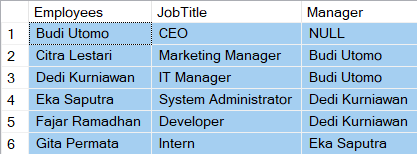
Both employees have been updated. Here is the SQL script to view the current state:
SELECT e.Name AS Employees,
   e.JobTitle, m.Name AS Manager
FROM Employees e
LEFT OUTER JOIN Employees m
ON e.ManagerId = m.EmployeeId;
Execution Output:
5.2.3 Time Travel Queries
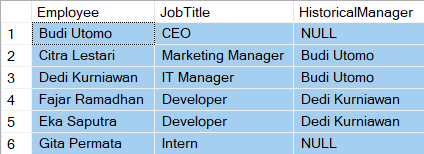
Want to know the list of employees and their managers’ names in the past? For example, on July 28, 2026, at 04:26 PM? Here is the SQL script:
SELECT e.Name AS Employee,
   e.JobTitle,
   m.Name AS HistoricalManager
FROM Employees
FOR SYSTEM_TIME AS OF '2026-07-28 04:26' e
LEFT JOIN Employees
FOR SYSTEM_TIME AS OF '2026-07-28 04:26' m
ON e.ManagerId = m.EmployeeId;
By adding the FOR SYSTEM_TIME AS OF clause, the SQL Server engine will ignore the current data and magically reconstruct the contents of the table exactly as they were on that specific date, and then execute the Self-Join for you.
⚠️ Important Practical Note:
Make sure the timestamp in the FOR SYSTEM_TIME AS OF clause is set to a time before you performed the UPDATE commands in step 5.2.2. If you enter a date/time that falls before the sample data was first inserted (INSERT), SQL Server will return an empty result because that data has not yet been recorded in the system.
Execution Output:
5.3 Modern SQL: When to Replace Self-Joins with Window Functions
In modern SQL standards, using Self-Joins for sequential or positional comparisons is often an anti-pattern.
For instance, to retrieve an employee alongside the preceding employee ordered by EmployeeId:
Legacy Approach (Self-Join):
SELECT e.Name,
   m.Name AS PreviousEmployee
FROM Employees e
LEFT JOIN Employees m
ON e.EmployeeId = m.EmployeeId + 1;
Important Caveat: This positional Self-Join logic strictly relies on the assumption of contiguous IDs (no missing or deleted sequence numbers, e.g., 1, 2, 3, 4). If an
EmployeeIdis deleted or skipped (e.g., sequence jumps from 2 straight to 5), the conditione.EmployeeId = m.EmployeeId + 1fails, returning a falseNULLforPreviousEmployee.
Modern Approach (Window Function):
SELECT Name,
   LAG(Name, 1)
   OVER (ORDER BY EmployeeId) AS PreviousEmployee
FROM Employees;
Why Window Functions are Superior:
- Gaps in Sequences:
LAG()operates on the physical or logical row order rather than mathematical arithmetic on primary keys. It seamlessly handles gaps or non-contiguous IDs without breaking. - Single Table Scan:
LAG()processes the dataset in a Single Table Scan, keeping values in memory as it iterates over the window frame. This cuts Disk I/O in half and yields significant performance gains compared to joining the table against itself.
VI. Summary & Hands-On Exercises
6.1 Quick Recap: Mastering the Core of Reflexive Relationships
We have come a long way—from dissecting the mathematical roots of Self-Joins back in the 1970s to exploring optimization tactics in the modern database era. If there are three key takeaways you should take home from this article, they are:
- No Special Syntax Required: A Self-Join is not a new keyword or a standalone feature in SQL. It is a pure logical trick where we use a conventional
JOINand fool the database engine using Table Aliases (AS). - Design vs. Execution: Do not confuse a Self-Relationship (the business rule designed in your ERD via a circular Foreign Key) with a Self-Join (the actual SQL command used to retrieve that data).
- Pitfalls & Performance: Beware of data cloning or double-counting traps by using ID comparison filters (
<). Prevent losing top-level data by utilizingLEFT JOIN, and always index your foreign keys to avoid quadratic computation overhead, \(O(N^2)\).
6.2 Test Your Skills: Real-World Analytical Exercises
To ensure you don’t just read the material but actually master the concepts, try solving these 3 practice case studies using the sample Employees data we created back in Chapter III:
Problem 1: Detecting Manager Workloads (Hierarchical Analysis)
- The Challenge: HR wants to conduct a workload evaluation. Write a query that displays the Manager’s Name, Manager’s Position, and the Total Number of Direct Reports (subordinates) reporting to them.
- Clue: You will need to combine a Self-Join with the
COUNTaggregate function and aGROUP BYclause. Make sure managers who don’t have any subordinates yet are excluded from this report.
Problem 2: Horizontal Relationship Audit (Finding Teammates)
- The Challenge: The company wants to establish a peer-mentoring program among employees holding the same job title (horizontal). Write a query that displays pairs of employees who share identical positions.
- Target Output: The report must be free from Data Cloning (an employee paired with themselves) and free from Double Counting (if pair A and B has already appeared, do not show pair B and A).
Problem 3: Hunting the “Lone Rangers” (Recursive Anti-Join)
- The Challenge: Display a list of employees whose positions are completely isolated: they do not have a direct manager (not because they are the CEO, but because their placement status remains unassigned), and they do not manage any staff members either.
- Clue: Leverage our extreme sample data points and use an Anti-Join approach via the
NOT EXISTSclause to track down these specific rows.
Next Steps: Try typing out the queries above in your database client. Once your query successfully spits out clean, accurate data without any duplication bugs—congratulations! You have just leveled up into a much more formidable data practitioner.
Thanks for reading! If you’d like to support my writing journey, you can treat me to a coffee here. Every bit of support is deeply appreciated!
Bibliography
Codd, E.F. (March 1972). “Relational Completeness of Data Base Sublanguages” in Computer Sciences. San Jose, California: IBM Research Laboratory.
Connolly, Thomas M., & Begg, Carolyn E. (2015). Database Systems: A Practical Approach to Design, Implementation, and Management. 6th Edition. Essex, England: Pearson Education.
Coronel, C., Steven, M., Crockett, K., & Blewett, C. (2020). Database Principles: Fundamentals of Design, Implementation, and Management. 3rd Edition. Hampshire, United Kingdom: Cengage Learning